New software implementations can be a risky undertaking. Many factors can lead to success or failure: resistance to change from users, software not properly adapted to business processes, and even a market change in some cases. In this article, we will concentrate on business process analysis as a way to reduce the risk of software implementation.
Conducting a robust process analysis is useful in many ways, but especially to help you find weak points in current processes. It’s an activity that can bring significant benefits at any time, but particularly in the case of a new software implementation it’s the most ironclad method to make things work as expected. Of course, it can’t promise you a 100% guarantee of success, but at the very least it helps increase your awareness of problems and critical points in your organization.
Consultants usually propose a process analysis before starting the software implementation. It’s a standard and accepted practice, and potentially it reduces risks of failure. However, in most cases this job could be done internally, because real business knowledge is located inside the firm. An external company can point out fresh ideas (and for this reason should be taken into consideration), but in the case of limited budgets, it can be accomplished with internal resources. Pay particular attention to the team structure and composition as the job should be done by the people that are not directly involved in the analyzed process: it is important that a neutral point of view is taken to represent the situation without distortion.
We can divide the procedure in two phases: “as is” analysis and “to be” process design. After these steps, you will be ready to choose the right software. Software implementation then becomes a matter of execution, by following the guidelines of the process analysis. Of course, implementation is not necessarily then an easy task, but with the proper preparation the risk of failure can be consistently reduced.
“As is” Business Process Analysis
It all starts with the “as is” process analysis, which consists of mapping the current situation of the processes the new software should integrate. One piece of good advice is to interview the people at work (not the boss), and that’s because real knowledge of the process is where the job is effectively done. It’s incredible how much knowledge is uncovered with this process. Ask people about their daily job: where they feel are doing well and where they think they are wasting time. Create a list of these “weak spots” and identify the points where the process is not working as expected. Again, ask them for a solution, or for what they would do to make things more efficient. It’s not only an “organizational” problem: this phase can also be used to identify points where the current software lacks key features or functionality. There could be parts of the process not supported by any automated software, or parts where multiple types of software do the same thing. It’s important to take note of these problems, as they will be vital when choosing the right software to implement.
There are various sources on the Internet that should help you designing business processes. In my experience as business consultant, I can say that normal office productivity suites (for example, Microsoft Office or Libreoffice) are enough to create a good library of business processes. It’s important to design processes using clear representation: actors and tasks should be correlated, and tasks should be connected in a sequential way. In other words, it’s a flow chart method.
Below is an example of “as is” analysis:
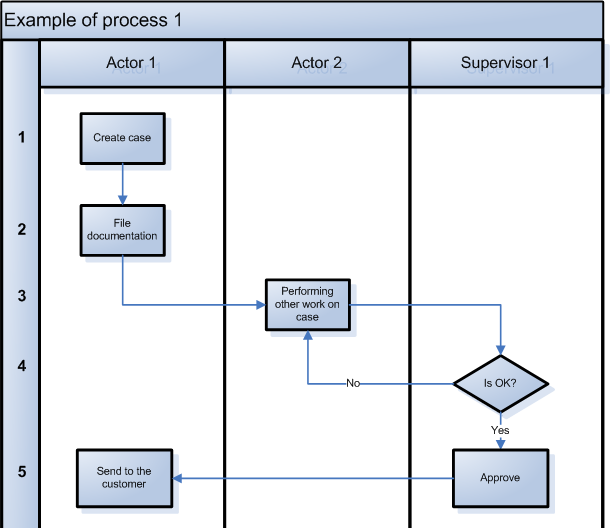
Note that every step is numbered. This helps you create a table to point out problems, weak spots and proposed solutions, each linked to a specific step. See below for an example:
| Step | Weak points | Proposed solutions |
| 3 | Example – Actor 2 reads the entire case, taking a long time. | Example – Creating a summary of the essential information. |
| 4 | Example – Output sent manually using email | Example – Automated sending from current software. |
Where applicable, the analysis should consider current software deficiencies, and where new features could be valuable to the process.
“To be” Process Design
Designing new processes or updating new ones is a significant and important challenge. Here we are entering the field of “organizational science”, and there are a host of issues to consider that are beyond our scope here. The key point, however, is to consider the implementation of a new system as an excellent opportunity to create or update your processes, increasing your efficiency and effectiveness.
Here is a simple matrix that describes advantages and disadvantages of the two approaches “evolutionary” and “new processes”.
| Evolutionary approach | New processes | |
| Advantages |
|
|
| Disadvantages |
|
|
Implementation of new software is a significant investment, with the upfront cost expected to yield substantial returns in terms of efficiency and effectiveness in the long term. However, without proper process analysis the returns could be less than expected or even fail to eventuate at all in the case of failure. Also, if new software implemented simply follows the same patterns and replicates the weak spots currently present in the organization, then organizations risk returning to the “old” software after a few months.
Process design should be considered as a great opportunity that offers a significant return on your initial effort. You would be well-advised to take the time to properly review and design your processes before embedding them in a new system.